

daily-integral
Generates a new integral to solve every day. Submit your answer and see how you rank on the daily leaderboard!
The final app is deployed at daily-integral.vercel.app/!

App Overview
The integral
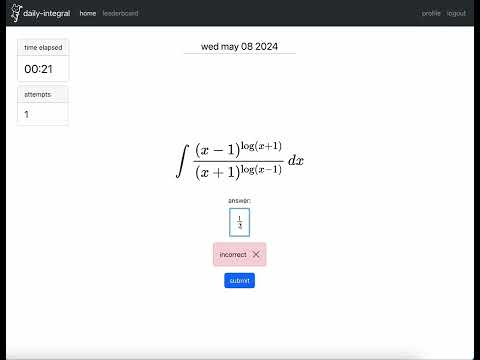
Integrals corresponding to the current dates are stored and fetched from a JSON file located in the client/public subdirectory. User input is handled by MathQuill and is validated—the website keeps track of the elapsed time, as well as the number of attempts to solve it.

Daily leaderboard
Correct daily submissions are posted on a leaderboard ranked first by attempts, and then by fastest time. (Guessing is penalized!) If a user is not logged in (JSON web token does not exist), the app shows what their rank would have been for the day, and they can choose to login to save and post their scores to the leaderboard if they want.

Secure user authentication with bcrypt, Context API
Users who are not logged in but have submitted a correct solution have their solution time and # attempts saved in the React state Correct solutions are stored in the state of the website, and are handled with React’s Context API. User information is stored in a MongoDB database - the passwords are encrypted with bcrypt, so neither malicious hackers nor I can go through the database and steal your passwords.
Context API is also used to keep track of whether a user is signed in or not. Once signed in, successful login states are stored in a JSON web token and are stored in the app’s context (For example, this context to determine whether to post a user’s solution to the leaderboard or to only display their place on the leaderboard as “you”.)

What I learned
1. Asynchronous operations are hard
Making an app of this complexity showed just how quickly asynchronous operations can get messy. Especially when rendering database content from MongoDB, I had to account for the time it would take for data to be posted to/fetched from the database, and the myriad of errors which sprang from not having particular data come in before it needed to be used.
2. Implementing secure user authentication
I wanted to find an authentication flow where users could provide passwords without having them be exposed to the database administrator. This naturally led me to using the bcrypt library in the final aplication. Because it handles both hashing and salting passwords, it felt like the most comprehensive choice.
3. React is a front-end library
This project made me experience first-hand just how front-end oriented React was. While creating the various components in the website, I learned a lot about the different CSS stylings, such as:
- the difference between margin/padding, justify/align
- flex and grid layouts
- VH/em sizings
- xs-md-lg-xl dynamic rendering
And many more. I built up more familiarity with Bootstrap and MaterialUI, made custom stylesheets for many components, and also experimented around with custom fonts. (See client/src/fonts!) I also had fun drawing my own custom logos and favicons.
4. The utility of modularization
One interesting aspect of this project is the level of modularization it forced me to employ. Integrating both front and backend into a single GitHub repository meant I had to create separate servers for /client and /server functionality.
/client
Within /client, I have it separated into components, pages, and contexts. As components are often reused throughout pages, I thought this was most logical.
/server
Within /server, I have it separated into models and routes, where models define the structure of the MongoDB collections, and the routes define the API endpoints through which I interact with the data.
My directory structure
.├── client/│ ├── node_modules/│ ├── public/│ │ ├── daily_integral_favicon.png│ │ └── index.html│ ├── src/│ │ ├── components/│ │ │ ├── AnswerInput/│ │ │ │ ├── AnswerInput.css│ │ │ │ └── AnswerInput.jsx│ │ │ └── ...│ │ ├── pages/│ │ │ └── ...│ │ ├── contexts/│ │ │ ├── UserEntryContext.js│ │ │ └── ...│ │ ├── index.js│ │ └── ...├── server/│ ├── node_modules/│ ├── routes/│ │ ├── userRoutes.js│ │ └── ...│ ├── models/│ │ ├── User.js│ │ └── ...│ ├── server.js├── .gitignore└── README.mdYouTube
A final demo video can be found here!